
Annotations and Selection
Total Length
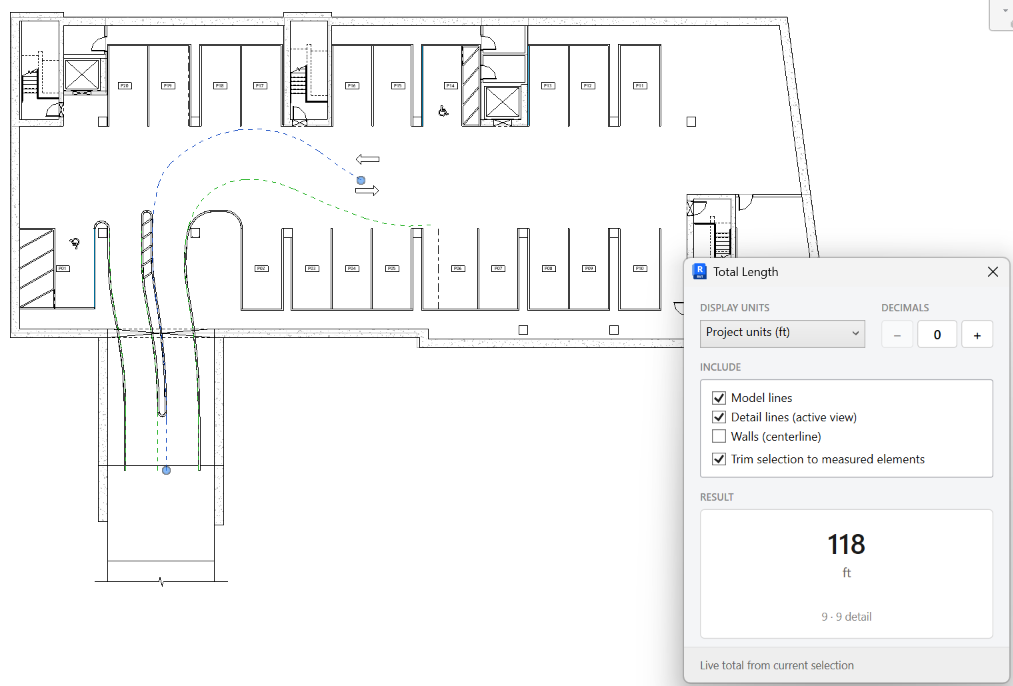
Show the total length of the current selection for model lines, detail lines, and wall centerlines.
When to use it
Use this for a quick takeoff of selected walls or lines without building a schedule.
Why it exists
Temporary dimensions and the Measure tool are one segment at a time. This keeps a live total, with units and decimals, in a small modeless panel.
How to use it
-
Select lines or walls
Model lines, detail lines in the active view, and walls (centerline) are included.
-
Open Total Length
On the ✚ Annon App tab, click Total Length.
-
Set units and decimals
Match the units the estimate or sketch needs. Change the selection while the panel stays open to refresh the total.
Keep in mind
- This is a readout, not a write-back to a parameter.
- For quantity by parameter value, use Parameter Values or a schedule.
Related tools
 Select By Categories
Filter the active view by category, then pick elements of those categories.
Select By Categories
Filter the active view by category, then pick elements of those categories.
 Select Similar
Select elements that match a picked sample by category, family, or type, in this view or the entire project.
Select Similar
Select elements that match a picked sample by category, family, or type, in this view or the entire project.
 Grids Dimensions
Place dimensions between parallel grids for the selection or the current view.
Grids Dimensions
Place dimensions between parallel grids for the selection or the current view.